F EQ · Free Tilt Equalizer
Simple controls.
Powerful tone shaping.
F EQ combines classic tilt equalisation with steep cut filters, analogue character and harmonic saturation. Darken or brighten a sound, shape the low end and add just enough colour, all in a compact interface.
Windows 64-bit · VST3 · CLAP · Standalone
Download F EQ 0.1.10 for WindowsUser guide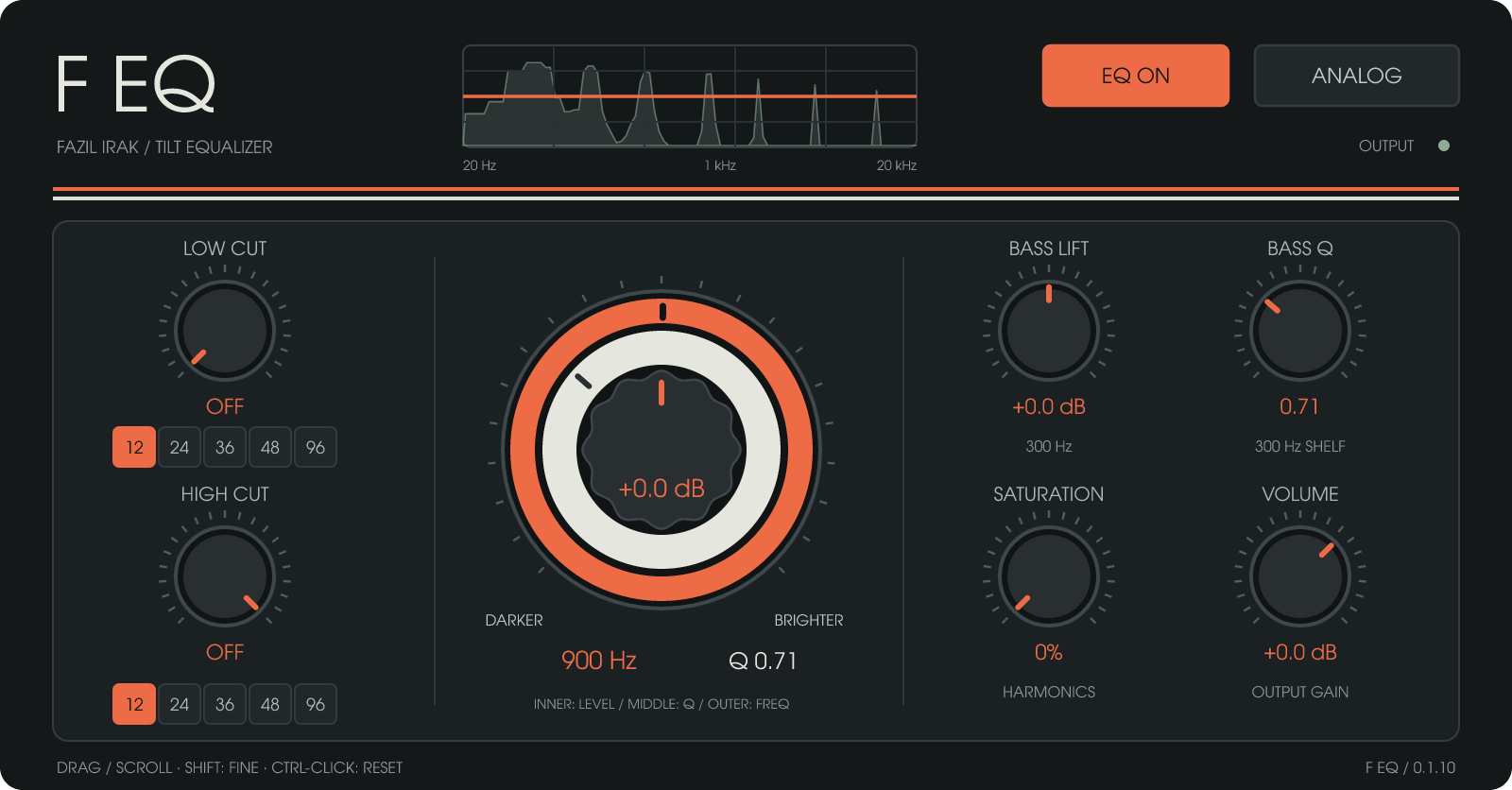
Three controls. One centre.
Three concentric controls shape the overall tonal balance. The grey inner knob sets Tilt, the off-white middle ring sets Tilt Q and the orange outer ring sets the pivot frequency.
Turn Tilt right to boost highs and reduce lows, or left to strengthen lows and soften highs. Pivot and Q determine where and how the transition occurs.
- Tilt: −12 to +12 dB
- Pivot: 200 Hz–4 kHz
- Independent Tilt Q
- Logarithmic frequency movement and fine adjustment
Set your frequency boundaries
Use Low Cut and High Cut to remove unwanted lows, limit highs and place a sound in the mix. Choose independent 12, 24, 36, 48 or 96 dB/octave slopes.
- Low Cut: 20–500 Hz
- High Cut: 1–22 kHz
- Switch either filter off independently
- Smooth parameter and slope changes
Separate control of the low end
Bass Lift is a 300 Hz low-shelf filter, independent of Tilt. Add body to a thin recording or reduce a heavy low end, with −12 to +12 dB of gain. Its dedicated Bass Q control shapes only this shelf’s transition.
Analogue touch and saturation
Analog adds subtle character through very low-level noise and small band-gain variations. Saturation adds harmonics through a separate control. Use either independently or combine them. At zero, saturation processing is bypassed.
See what you hear
The graph displays the EQ curve and real-time output spectrum together. The orange line shows the linear EQ response; the faded area behind it shows the processed signal’s frequency distribution. The promotional image uses a spectrum calculated from an example signal.
A smooth workflow
- Drag controls or use the mouse wheel
- Hold Shift for fine adjustment
- Ctrl/Alt + click to reset the targeted control
- DAW automation and session recall
- Mono and stereo support
- Output level control and full bypass
Download F EQ
Free Windows 64-bit package containing VST3, CLAP and the standalone EXE.
Download F EQ 0.1.10 — ZIPRead the user guideDeveloped by FAZIL IRAK.
Production tracking · Process management · Custom software

