Model F 0.2.2 · User guide
From your first note
to your own sound.
Installation and operation of the Windows 64-bit VST3, CLAP and standalone releases. This guide covers version 0.2.2.
Download the Windows packageBack to Model F1. Install and start
- Extract the ZIP to a folder before use.
- VST3: copy the entire Model F.vst3 folder to a VST3 location scanned by your DAW. Do not move only the file inside it.
- CLAP: copy Model F.clap to your DAW’s CLAP folder.
- Rescan plugins and add Model F to a MIDI/instrument track. Use a format supported by your DAW.
- Standalone: run Model F.exe and click the on-screen keys.
Common Windows plugin locations (copying here may require administrator permission):
C:\Program Files\Common Files\VST3
C:\Program Files\Common Files\CLAP
Keep the README, licence and third-party notices supplied with the package.
2. Quick start
- Click the preset name and choose a Bass sound.
- Send MIDI from your DAW or use the on-screen keyboard. Click the key area first to play with A W S E D F T G Y H U J K on your computer keyboard.
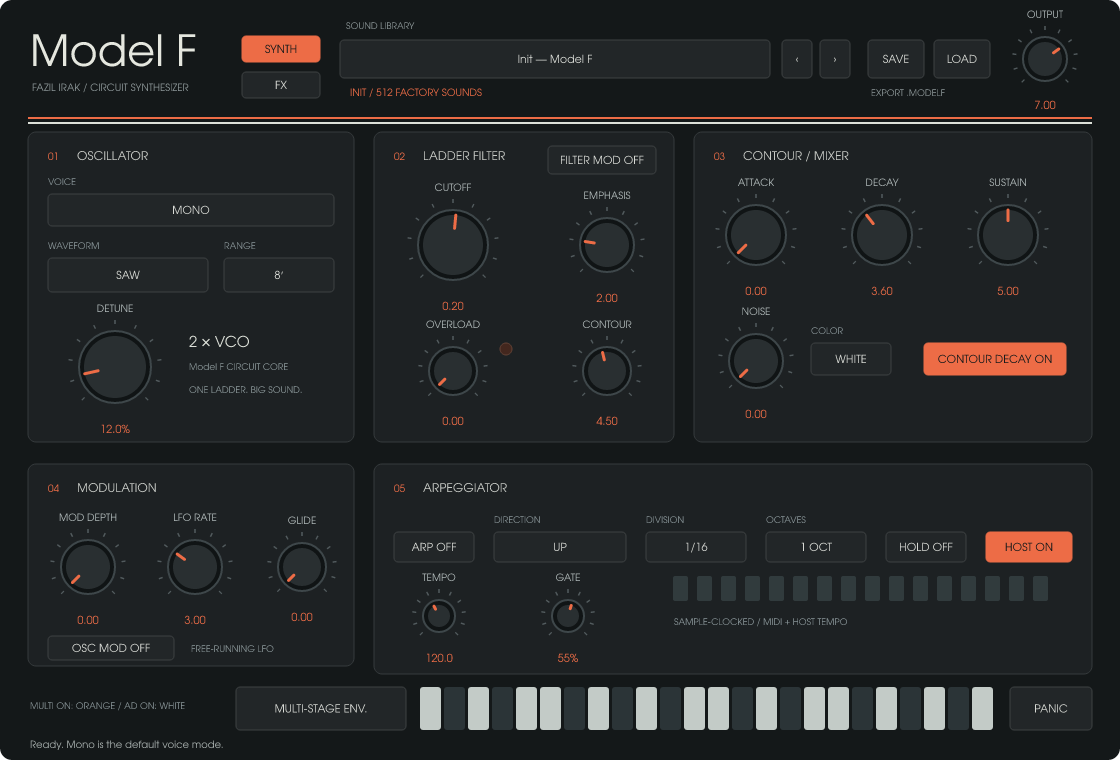
- Adjust CUTOFF, then CONTOUR to change the envelope’s influence on the filter.
- Use DETUNE to widen the oscillators and balance the level with OUTPUT.
- Use SAVE to store your sound under a new name.
3. Operating controls
- Drag knobs vertically or use the mouse wheel. Hold SHIFT for fine adjustment.
- CTRL or ALT + click resets the targeted control.
- Left-click selectors to move forward; right-click to move backward.
- MIDI pitch bend spans ±2 semitones. The mod wheel adds LFO modulation depth.
- Click the Model F logo for version information; close with ESC, Enter or CLOSE.
4. Oscillators and voice modes
| Mode | Behaviour |
|---|---|
| MONO | Default: two oscillators, one note, lowest held note priority. |
| POLY | Four notes, two oscillators per note. |
| SUPERSAW | Fixed seven saw oscillators per note and eight-note polyphony. Waveform stays saw; DETUNE sets the frequency spread. |
| OCTAVE / FIFTH | Second oscillator one octave / seven semitones higher; monophonic. |
| RING / RING POLY | Multiplies the two oscillators before filtering; mono / four notes. |
WAVEFORM selects one of six waves, RANGE selects 32′–1′, DETUNE adjusts oscillator separation and GLIDE smooths pitch transitions. NOISE offers white and pink noise. At the voice limit, the oldest released voice is reused first, otherwise the oldest held voice.
5. Filter, contour and modulation
CUTOFF sets the ladder filter frequency, EMPHASIS sets resonance and CONTOUR adjusts envelope depth. ATTACK, DECAY and SUSTAIN jointly control filter and amplitude contours. With CONTOUR DECAY enabled, release after a key is lifted follows the DECAY time.
Set MOD DEPTH and LFO RATE, then enable OSC MOD or FILTER MOD routing. OVERLOAD saturates the mixer before the filter and adds harmonic density. Zero preserves the dry character; compare levels with OUTPUT as you increase it.
6. Multi-Stage Envelope
MULTI-STAGE ENV. opens the large editor while keyboard and MIDI remain active. ESC, CLOSE or the same button closes the editor without disabling modulation. The button stays orange while Multi is active.
- MULTI ON / AD MODE: Multi uses the editable graph; AD mode uses AD ATTACK / AD DECAY for additional modulation. The main contour continues to work.
- Double-click empty space to add a point; double-click a point or select it and press Delete to remove it. Up to 16 internal points are supported. Drag or use arrow keys to move points; SHIFT gives fine control.
- Select a point to reveal separate square left/right curve handles. Drag them to shape segments; double-click a handle to reset it. Start and end levels are linked.
- X grid: 2–16 cells. Y grid: 2–64 divisions. SNAP aligns new and moved points to the grid.
- CTRL + left-drag paints the selected BRUSH wave into cells: Sine, Triangle, Saw Up/Down, Square, Pulse, Steps or Random. NODE and NODE DEPTH edit the segment beginning at the selected point.
- DURATION: 0.05–10 seconds. CURVE changes the overall segment curvature.
- ONCE plays the graph once; LOOP repeats while the key is held; HOLD waits at the last internal point. Loop/Hold return to zero in about 20 ms after release; Once continues to the end.
- TARGET: Filter, Oscillator Pitch or Volume (Output). Filter/Pitch AMOUNT is bipolar. For Volume, +100% applies the shape, −100% applies its inverse, and zero retains normal level. Volume modulation does not add gain.
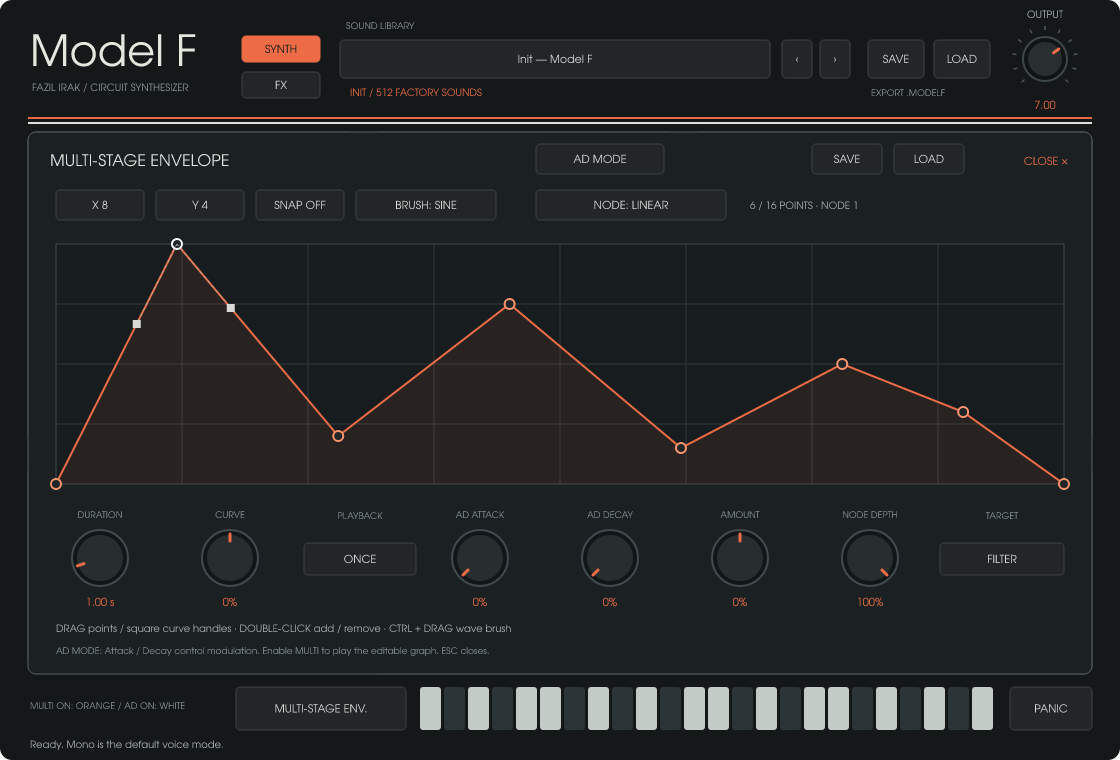
Envelope SAVE/LOAD stores shape plus playback/grid settings as .modelfenv, leaving synth, Amount, Target and AD settings unchanged. Main preset SAVE includes all envelope settings with the sound; DAW sessions also retain them.
7. Arpeggiator
Enable ARP and choose UP, DOWN, UP/DOWN or RANDOM; one to three octaves; and 1/4, 1/8, 1/8T, 1/16, 1/16T or 1/32 division. GATE sets note length. HOST uses DAW tempo when available; otherwise TEMPO supplies the internal tempo.
HOLD sustains the pattern. After releasing all keys, a new chord replaces the previous one. Stopping the DAW or moving its timeline backward clears held arp notes.
8. Built-in effects
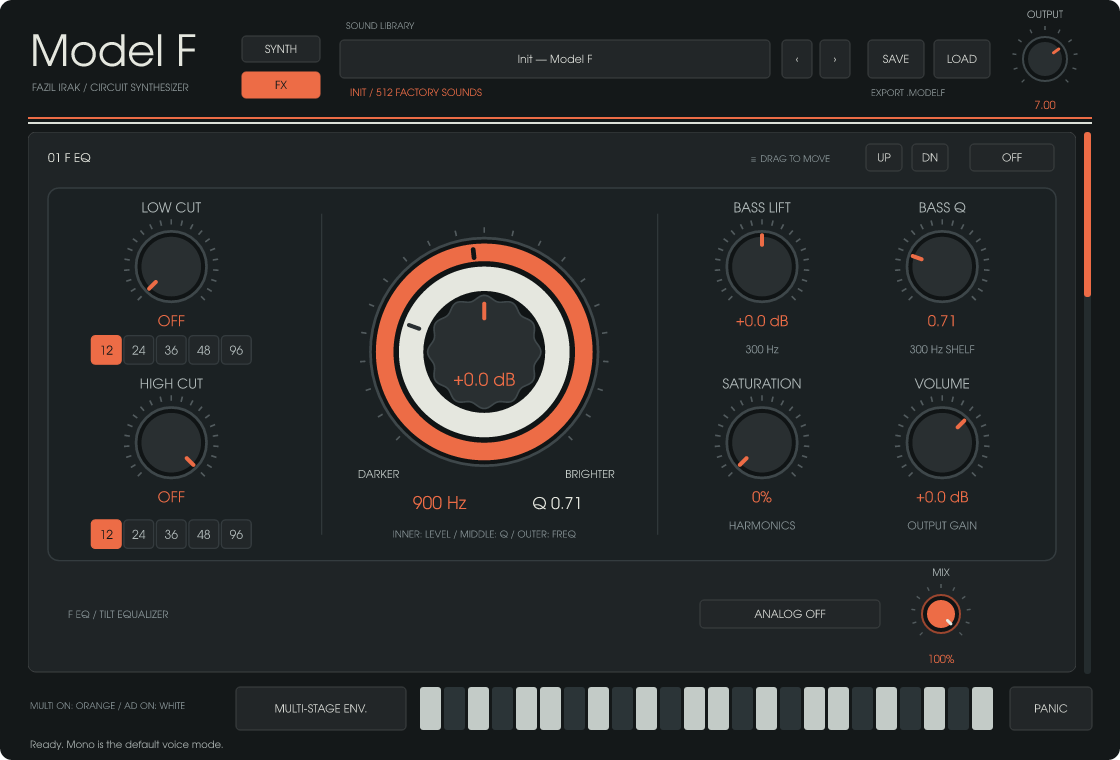
SYNTH / FX switches pages within the same instrument. Drag effect headers or use UP / DN to reorder the chain. Each effect has on/off and Mix controls. Default order: F EQ → Inflator → Phaser → Chorus → Stereo Delay → Reverb.
| Effect | Controls and use |
|---|---|
| F EQ | Tilt, Pivot, separate Tilt Q and Bass Q, Low/High Cut slopes, Analog, Saturation and Volume. Inner cap: Tilt; white ring: Q; orange ring: Pivot. |
| Inflator | Input, Amount, Curve, Clip, Split, Output and Mix for harmonic density and level. |
| Phaser | Rate, Depth, Center, one to six stages, Feedback, Spread and Mix. |
| Chorus | I / II / I+II modes, Rate, Depth, Width and Mix. |
| Stereo Delay | Independent L/R times, Link, Sync, Ping Pong, Width, Duck, feedback Drive, Low/High Cut, Mod Rate/Depth, Wow and Diffusion. Free time: 10–8000 ms; long synced times are capped at eight seconds. |
| Reverb | Size, Decay, Pre Delay, Low/High Cut, Width and Mix. |
Delay Duck reduces the audible repeats; Drive acts in the feedback path. The mouse wheel edits knobs when hovered and scrolls the FX page over empty space. OUTPUT follows the entire chain; zero also silences tails. Older presets may load with FX disabled.
9. Presets and files
512 factory sounds: Bass 86, Lead 86, Key 85, Pad 85, FX 85 and Arp 85. Click the preset name, then filter by category or text. × clears search. A single click loads a sound and keeps the browser open; double-click loads and closes it. Arrows select previous/next sounds. A dot marks an edited sound.
- SAVE stores a named sound and category in your user library; an existing name requires a new name.
- LOAD opens a .modelf file.
- EXPORT .MODELF saves the current sound to a chosen file.
- User presets are stored in %APPDATA%\Model F\Presets.
- DAW sessions retain parameters, preset name, envelope settings, FX settings and chain order.
10. Troubleshooting
- Plugin not found: check x64 and format support, scan folder and the complete VST3 folder, then rescan.
- No sound: check the instrument track, MIDI input, audio output and OUTPUT. Try another preset to rule out envelope or FX settings.
- Stuck sound: PANIC clears held notes, contour/envelope movement, arp HOLD and delay/reverb buffers with a short fade. New MIDI notes can still produce new sound afterward.
- Crackles or high CPU: SuperSaw, long tails, sample rate and FX affect load. Try a simpler preset, disable unused effects and increase your audio buffer.
Version 0.2.2 · Questions: info@fazilirak.com
Model F product pageProduction tracking · Process management · Custom software

